Update - 30 May 2026
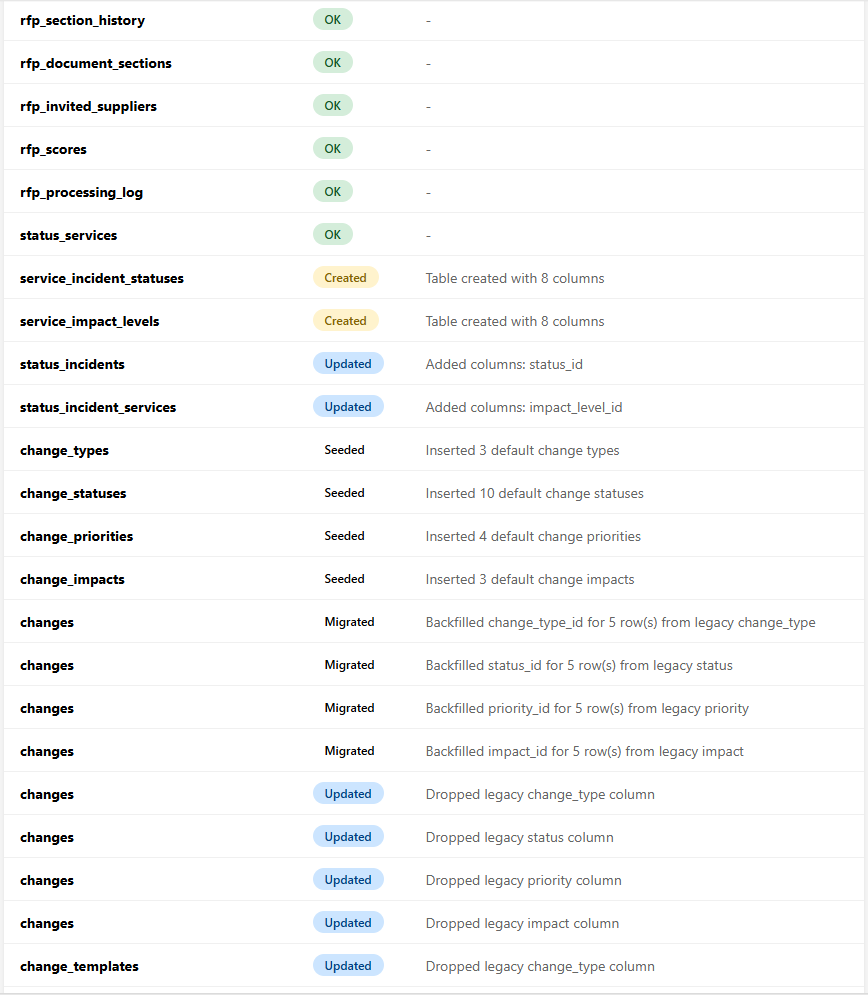
A big catch-up. The headline is single sign-on — sign in via Keycloak, Microsoft Entra, Okta, Google and other OpenID Connect providers, with the flexibility to run different user groups on different providers and a local-login fallback that means nobody gets locked out. Alongside it: the new Workflows automation engine, Excel-style Table views across several modules, Tasks calendar & timeline, Forms versioning and new field types, customer-satisfaction surveys and screen recordings on Tickets, Process Mapper custom step types, an asset lifecycle layer, and a broad consistency polish across the whole app.
Sign in with single sign-on (SSO)
You can now log in to FreeITSM through an external identity provider — Keycloak, Microsoft Entra ID, Okta, Google Workspace and other OpenID Connect providers. The provider handles the password and MFA; FreeITSM just receives a verified, signed token. Read the deep dive or the setup guide.
Roll out SSO at your own pace
Assign individual users to a provider so you can move people across in cohorts — run an Entra pilot for one group while everyone else stays on Keycloak. An email-first login routes each person to the right place, local login remains as a fallback, and signing out now ends the provider session too.
Single Sign-On admin page
A new System → Single Sign-On screen to add and manage identity providers, with a built-in "test" button to check a provider before saving and master on/off switches. Client secrets are stored encrypted.
New module: Workflows
A cross-module automation engine: when something happens, run the actions you choose. Build rules once and let them handle the repetitive work. Read the deep dive.
Visual workflow canvas
A drag-and-drop visual canvas for building workflows, replacing the original form-based editor.
AI co-author for workflows
Describe a workflow in plain English and the AI scaffolds it on the canvas for you to tweak and save.
Choose your AI provider for Workflows
Per-module AI settings let you pick the provider, model and key, with both Anthropic and OpenAI supported.
Friendlier workflow conditions
Conditions now show real values rather than internal ids, and support OR-style multi-select in a single line.
Real workflow actions
Workflows can now set status and priority, assign, add notes, send emails, and create tasks and tickets — with variable substitution and a friendly per-action form instead of raw JSON.
Tickets trigger workflows
Ticket changes now fire live workflow events, so creating, assigning or re-prioritising a ticket can drive automation.
Forms, Tasks and Changes trigger workflows too
Submitting a form, completing a task or approving a change can now kick off a workflow — all the trigger events are live.
Smarter condition operators
The operator choices now match the field type, so irrelevant options no longer clutter the list.
Workflows help guide
The help page gained a left guide panel with scroll-spy navigation.
Loop protection
Behind-the-scenes safeguard so a workflow can't trigger itself into a runaway loop; any blocked run is recorded in the audit trail.
Tasks calendar view
See your tasks laid out on a calendar by date.
Tasks timeline (Gantt) view
A Gantt-style timeline view of tasks across their start and due dates.
Month / Week / Day on the tasks calendar
The tasks calendar gained Month, Week and Day views matching the Calendar module.
Drag & right-click on the timeline
Drag timeline bars to reschedule, drag their edges to change start/due dates, and right-click for quick assignment, status and priority changes.
Tasks table view with inline editing
A full-screen, Excel-style grid of tasks where you can edit cells in place, with filters, sorting, column control and CSV export.
Quick-look panel on the calendar
Clicking a task in the calendar opens a slide-in detail panel instead of navigating away.
Quick-look panel on the timeline
Clicking a task on the timeline now opens the same slide-in detail panel.
Configurable board card fields
Choose which fields appear on the task board cards.
Right-click board cards
A right-click menu on board cards for quick actions.
Search your tasks
A search box on the board and list views.
Task tags
Tag tasks and filter by them.
Reorder board columns
Drag task board columns into the order you want.
Tasks in your language
The Tasks module is now fully multilingual.
Tasks help guide
The Tasks module gained a full in-app help guide.
Task start dates
Tasks now have a start date as well as a due date.
One column per status
The task board now shows a column for each status.
Consistent calendar toolbar
The tasks calendar toolbar now mirrors the Calendar module's header.
Timeline auto-fits the screen
The timeline now sizes itself to the available width — no more zoom buttons.
Tidier Tags settings
Each section of the Tags settings tab now sits in its own panel.
Tasks help updated
The help guide now covers the calendar, timeline and table views.
Right-click to create a connected step
Right-click a step to drop a new step that's already connected to it.
Custom step types
Define your own palette of step types to suit your processes.
Custom step types in the editor
The editor is fully driven by your custom step types.
More right-click actions + rubber-band select
Four more right-click actions, plus rubber-band selection across lanes.
PNG and PDF export
Export your process maps as PNG or PDF.
More step actions, links and sticky notes
The step right-click menu gained eight new actions, per-step URL links, and sticky-note annotations.
Hideable left panel
The left panel can be hidden and slid in on hover, controlled from a new Settings tab.
Recolour on type change
Changing a step's type now repaints it in that type's default colour.
Bookmarkable diagrams
Selecting a process updates the URL, so diagrams are bookmarkable and back/forward moves between them.
No more flicker mid-drag
The step detail panel no longer flashes open while you drag.
AI settings for Forms
A per-module AI tab for Forms with its own provider, key and billing.
Four new field types
Forms gained email, number, radio-button and multi-select checkbox fields.
Form versioning
Save updates a form in place, or save it as a new version — and browse the full history from a Versions dropdown.
Dedicated form editor page
Editing a form now has its own clean page and URL.
Version details in the builder
Author, created/modified dates and version number are shown in the builder.
Context-aware AI Assist
When editing an existing form, AI Assist now modifies it rather than replacing it.
Restructured form editor
Tools at the top, completion actions at the bottom, and version details in a slide-out drawer.
Forms dashboard table
The Forms landing page is rebuilt as a full-width dashboard table.
Tidier add-field popup
The add-field popup is wider with neatly aligned badges.
Settings polish
General settings tidy-up and a consistent help-sidebar heading colour.
Customer satisfaction (CSAT) surveys
Customers can rate their experience when a ticket is closed, feeding satisfaction reporting.
Screen recordings on tickets
End users can record their screen straight from the new-ticket form — no plugins or third-party tools needed.
Month / Week / Day on the tickets calendar
The Tickets calendar gained Month, Week and Day views.
Manage end users from Tickets
Analysts can now create, edit and delete end users from the Users page.
Set status from the right-click menu
Change a ticket's status straight from the inbox right-click menu.
Set priority from the right-click menu
Change a ticket's priority from the right-click menu.
Assign from the right-click menu
Assign a ticket to an analyst from the right-click menu.
Full-width Rota page
The Rota page is now full-width with calendar-style navigation controls.
Tidier reply-cleanup settings
The reply-cleanup settings tab now uses a two-column layout, with a tab-cutoff issue fixed.
Consistent SLA settings text
Font sizes and muted-text colours are now consistent across the SLA settings.
Tidier SLA settings panels
Each SLA settings section now sits in its own panel, matching Global settings.
Settings tidied to sentence case
The Tickets settings area now uses consistent sentence-case wording.
Tickets help updated
The Tickets help page now covers the most recently added features.
Full-screen Assets table view
An Excel-style table of every asset with column filters, sortable/reorderable/hideable columns, CSV and PDF export, and per-user layout.
Build a location hierarchy
A new Locations tab lets you create an arbitrary-depth tree of sites, buildings and rooms for where assets live.
Locations, purchase & warranty details
Assets can be placed in your location hierarchy and carry purchase date, cost, supplier, order number and warranty expiry.
Check-in / check-out with a custody trail
Assigning an asset is now a check-out (with an optional due-back date) and removing it a check-in, with every movement kept in a custody history per asset.
Warranty-expiry alerts
Asset warranties can surface as alerts on the Watchtower dashboard and/or as Calendar events, with a configurable "warn X days before" threshold.
Suppliers from the shared registry
Asset suppliers are now picked from the same supplier list as Contracts rather than typed as free text — one record per vendor across the system.
Tidier assign-user dialog
Sentence-case labels, a shorter "Assign" button, and a fixed-height results box so the dialog no longer jumps around as you search.
Full-width Servers page
The Servers page now uses the full screen width, and a redundant Add button on empty dashboards is gone.
Settings tidied to sentence case
The Assets settings area now uses consistent sentence-case wording throughout.
New Table view
A full-screen, Excel-style grid of every event with inline editing, filters, sorting, column control and CSV export.
Settings tidied up
Sentence-case wording, single-word buttons and consistent action icons throughout calendar settings.
Standard tab layout
Calendar settings now use the same tabbed layout as the other modules.
Friendlier dialogs
Calendar settings now use the app's styled confirm dialogs and toasts instead of plain browser pop-ups.
Manage change-form sections
Settings now let you add, rename, reorder and delete form sections and drag fields between them, with the change form updating live.
New Table view for changes
A full-screen, Excel-style grid of every change with sorting, filtering, column control and CSV export.
Edit changes inline in the table
Edit type, priority, impact and assignee directly in the change grid; status and the detailed fields stay in the full form.
Tidier change form
Short fields now pair two-per-row automatically while longer fields take the full width.
Sticky Save/Cancel footer
The change editor gained a sticky footer with Cancel and Save.
Configurable sidebar visibility
Choose whether the Knowledge sidebar is always visible or shows on hover, per analyst.
Better review screen
A full-width review screen with a "Days overdue" column and a quick edit button.
Review screen search
The review screen moved to a clean URL with an inner-scrolling table and a search box.
Title and tags on one row
The article editor now puts Title and Tags on the same row.
Settings tidied up
Sentence-case wording and single-word action buttons.
Roomier AI settings
The AI integration tab now uses a two-column layout with a larger custom-instructions box.
Settings match the other modules
CMDB settings tabs now share the same look and spacing as every other module.
Settings tidied up
Sentence-case wording and modal buttons that match the rest of the app.
Draggable list/chart divider
Drag the divider between the checks list and the chart; the split is saved per analyst.
Chart fill setting
Choose a plain or gradient bar fill for the chart, saved per analyst.
Custom check statuses
Admins can add, rename, recolour, reorder and require notes per status — reflected on the dashboard, chart and PDF.
Full-viewport layout
The dashboard and settings now fill the screen.
Icon row actions
Settings row actions are now pencil and trash icons.
Chart polish
The chart now expands and collapses smoothly, with a cleaner header and more usable space.
Normalised statuses
Check results now use a proper status list, with a guided tool to tidy up any old data.
Full-viewport logs
The system-logs page now fills the screen.
Sticky logs pagination
System-log pagination is now a sticky footer with equal-width Previous/Next buttons.
Sentence case on system logs
System-log tabs, column headers and page title now use sentence case.
End-user help page
The self-service portal gained a help page for end users.
Hover-to-rate CSAT
The satisfaction survey now has a proper hover-to-rate star interaction.
Full-width dashboard + icon actions
The LMS dashboard now fills the screen and uses icon action buttons.
Module tidy-up
Sentence case, full-width settings, icon row actions and consistent help headings across the Software module.
Sentence case + Left-panel setting
A module-wide sentence-case sweep plus a new Left-panel tab in settings.
Sentence case settings
Service Status settings now use sentence case throughout.
Help & wiki updated
Help pages and the GitHub wiki brought up to date with the latest features.
Preferences in the avatar menu
Reach your preferences from the avatar menu on any page.
Account-based preferences
Your preferences now save to your account (not just the browser) and gather the per-user settings from across the app in one place.
Consistent notifications
App-wide standard toast notifications and confirmation dialogs.
Toggle switches + sticky buttons in dialogs
"Active" is now a toggle switch, and Save/Cancel stay pinned to the bottom of every settings dialog.
Consistent settings dialogs
Every settings dialog now shares one consistent look and feel.
Consistent dialog close controls
Dialogs across the app now close from a single Close button in the footer.
Clearer help navigation
Help sidebar headings are grey until selected, then take the accent colour — across every module.
Full-width admin pages
Settings and admin pages now fill the screen.
Consistent top navigation
Every module's top navigation now behaves the same — sticky, equal-width buttons, centred.