Watchtower Browser Extension
See your attention items at a glance from any tab
Your Watchtower, Always Visible
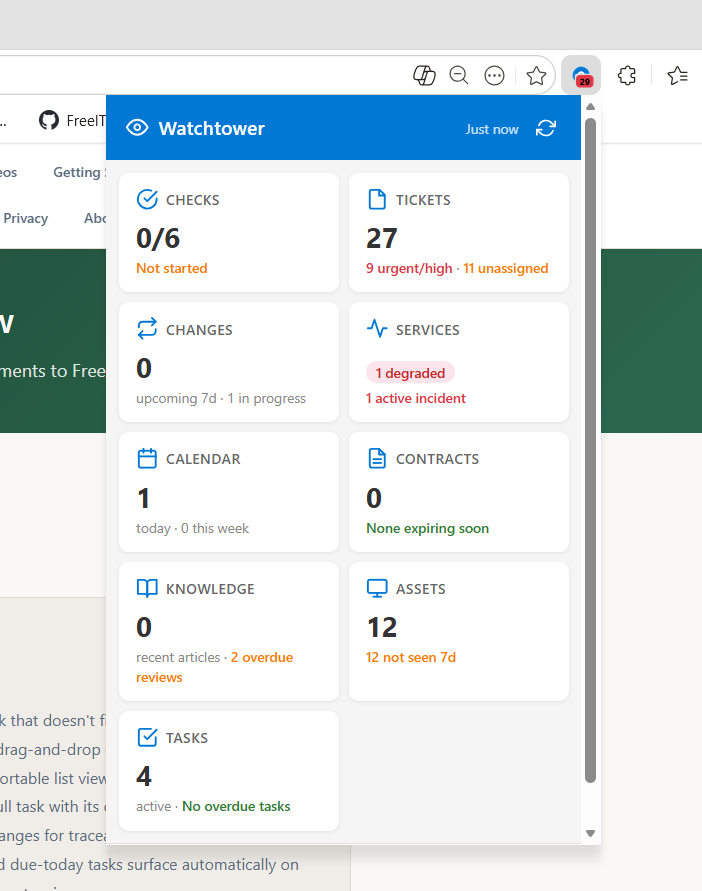
The Watchtower browser extension for Chrome and Edge puts your FreeITSM attention dashboard in your browser toolbar. A badge shows how many items need your attention — urgent tickets, unapproved changes, overdue tasks, active incidents — and clicking it opens a compact popup with the full summary. No need to keep FreeITSM open in a tab.
Badge Count
A number on the extension icon shows how many items need attention. Red for urgent, orange for warnings, hidden when everything is clear.
Popup Dashboard
Click the icon for a compact summary of all nine Watchtower modules — checks, tickets, changes, tasks, services, contracts, calendar, knowledge, and assets.
Configurable Polling
Choose how often the extension checks for updates — from every minute to every 30 minutes. Includes a manual refresh button.
Secure API Key Auth
Authenticates via API key — no session cookies, no passwords stored. Keys can be revoked instantly from the admin panel. Rate-limited to prevent abuse.
Setup Guide
-
Generate an API Key
In FreeITSM, go to Software > Settings > API Keys. Enter a label like "Chrome extension" and click Generate. Copy the key immediately — it won't be shown in full again.
-
Download the Extension
The extension is included in the FreeITSM repository under the
browser-extension/folder. Clone or download the repo from GitHub. -
Load in Chrome or Edge
Open
chrome://extensions(oredge://extensions), enable Developer mode (top-right toggle), click Load unpacked, and select thebrowser-extensionfolder from the repository. -
Configure the Extension
Click the Watchtower icon in your browser toolbar, then click Settings. Enter your FreeITSM server URL (e.g.
https://itsm.yourcompany.com/freeitsm-app) and paste your API key. Click Test to verify the connection, then Save. -
You're Done
The extension will start polling immediately. You'll see a badge count appear on the icon within your configured interval. Click the icon any time to see the full Watchtower summary popup.